Showing posts with label Tips & Tricks. Show all posts
Showing posts with label Tips & Tricks. Show all posts
How to verify Paypal easily and legally
How to verify Paypal easily and legally Sitting at Home! Step by Step!
Hello All,Well, I found people facing problems to get verified Paypal in Pakistan and also in some other countries. To sort out the problem;step by step; I wrote this tutorial for you all.
Advantage: You need not worry as you'll verify Paypal legally. Another advantage is, you will have your U.S Bank Account that you can use with any site including Paypal. Payments are handy to receive. You just need to reach near ATM and can get amount via Mastercard by Payoneer.
All steps are easy but still I have put screenshots to help you perform process step by step. If you like it please, follow me at twitter and like my page at facebook aslo share this post to help others. Thanks
Lets Start Now.
Step 1: Create your Payoneer Account. Its simple as you create sign up on other sites. http://share.payoneer-affiliates.com/a/clk/1jlvjR
When you click this, you will reach the Payoneer official site.
Step 2: Navigate to the Sign up Button simply. Click it.

Step 3: You will now see Payoneer Sign up Form. Start Filling it. See the Pictures.

Step 4: After filling this all, At " Almost Done " Tab. You have to add your any identity card number issued by the government of which you hold nationality.

You will see Application Completed >>> Review in Progress >>> Delivery Tabs by Payoneer.
Now, relax and check for the Email by Payoneer of confirmation of application. Don't worry, It comes within minutes. Now, Emails will arrive to you. See below as...

Step 5: Now Login and you will be asked to fill the security queries. See Below, Set them and Click Submit. And then you will see this page.

Check your account status.. That must be in " Reviewing Process "
Now, wait for the confirmation email. It will arrive to you soon. When It comes, It will tell you about the status for your master card approval.
Don't worry. If your application is confirmed, then it means, master card will be shipped to you soon.
NOTE : You will receive 2 emails. One of confirmation and other of US Payment service.
See Picture of US Payment service.

Step 6: Set the US PAYMENT Service Questionnaires from the Email Link as I highlighted above. And submit your Govt. Identity card or passport or driving license.

[ NOTE: You must have to upload this and answer questions. Don't worry. Questions are so simple. If you need help to answer them, you can comment below ]
==== Submit the answers and it will tell you about reviewing process.
And for the other email as I said, two.
It will be titled as " Your Payoneer-Affiliates Prepaid debit MasterCard card has been approved!"
===== I received both emails almost at the same time. same day., don't rush if few minutes vary at your side. ====
Step 7: Now, log in to your account from the email. And if you haven't set your US Payment service then set it by answering the questions and uploading any identity.
I took the picture of my passport from my android mobile simply and uploaded it.
===== I received the card at my home by AIR MAIL within 15 days. So, you must wait for it. and relax. ===

Once the card arrives to you. Open the Envelop and along with a card there will be an instruction page.
Its easy to read. Simply set your card pin number also, log in to verify your card by simply entering card number and other details of card. 3 digit security number is written at the back at one side, I mentioned this cause some people are confused about it.
Once you fill the details from card to payoneer account. You will receive an email on confirmation as below.

And for the confirmation of US Payment Service after Card will also come.
=================================================
Now, Attach this card with Paypal easily as you have your Bank Account at Hands also Master card.
For all users of Pakistan can use fake Address of being in US. It includes street, house, city, zip code, and phone. If you need a good fake address you can comment below to ask me. DON'T Worry. It is safe!
And others can use their own addresses easily.
Anyhow,
Step 8: Go to Paypal. Sign up by filling all details. Once you sign up, to verify your Paypal you need to attach a Bank account.
Now, go to your email or log in to your Payoneer account and copy the details of US Bank account you got.
Step 9: Now, enter the details simply. Bank name is Bank of America. Once you enter account number and routing number, and submit.
Paypal will take 2 days to verify. It means verified email will arrive to you after 2 days. So, relax. Your account is verified now.
You can add your master card too simply. Please, comment below for confusions and also, kindly follow me and like my Facebook page sticky above.
=====================
Some Answers:
Paypal will send 2 amounts to your Bank account. Means to your Payoneer account. Payoneer has attached our bank account with card. It means, when money is send to your Bank account you will automatically have it in your master card. So, You have to enter those amounts to Paypal account to verify. For this, Log in to your Payoneer account and check for Transactions area. You will see 2 statements of money received. So, note them and enter to Paypal.Your account is verified now.
When you have money in your Card you can withdraw it from near ATM easily.
Paypal don't send money to your any credit or debit card. It just add up the card to load the Paypal account. It means you can transfer money from CARD to Paypal not Paypal to Card. But you can transfer money from BANK to Paypal and Paypal to Bank easily.
I haven't attached the card as, due to Payoneer I receive direct money in card when money is transferred to my Bank account.
I hope I have cleared many queries. You can ask for more. Thank You Have a good day ahead!
Tutorial By: Aqsa Jamil
Tips to Improve Pagerank On Full Flash Website
Website with full flash is difficult to get a google pagerank, and Google has sought to maximize "reading" Flash websites. Google's difficulty in "reading" the flash because:

1. There are several "javascript" is not readable by googleboots, so if there is a flash file that is invoked using javascript, then google will not respond.
2. Google does not read the files that are externally connected to the flash files, such as XML, HTML, and PDF is invoked in Flash files. The files are readable but it will not be a single unit with the flash web.
3. Google difficulty reading the language contained in the Flash file that actionscript language.
This is certainly a problem because, many websites use Flash files for more animatif, more than html design exploration. Unlike the html website that can be "read" by search engines, faster access, but do not animatif and simple.
But there are strategies to improve the PageRank on full Flash websites are:
1. The html page using "call" in the middle of a flash file, and in the html file (which serves as the background) with the keyword inputted text colored similar to the background in order to be masked and not spoil the beauty of the design.
2. Another way is to create a blog as a supporter of the Flash websites. Blog only be used as a link that leads to a Flash website.
3. SEO is also important to increase pagerank. SEO for Flash websites is by creating links that point to a website.
*** Adobe Flash is a software application for creating animated very reliable. Completeness of features and tools owned, making this animation processing program option shall Animators and other professionals. Many things can be animated maker was done with this application, which are: designing the interface of a web page, create a presentation, make a game, make interactive multimedia and much more to do with the application program. ***
Ufone 3G Packages

| Basic Bucket Up to 256 Kbps | ||||
|---|---|---|---|---|
| Charges (PKR) | Volume | Validity (Days) | Subscription Code | |
| Half Day | 5 | 50 MB | *20 Hours | *810# |
| Daily | 10 | 40 MB | 1 | *804# |
| Weekly | 50 | 250 MB | 7 | *7811# |
| Monthly 1 GB | 200 | 1 GB | 30 | *7807# |
| Monthly 1.5 GB | 250 | 1.5 GB | 30 | *5506# |
| Monthly 3 GB | 500 | 3 GB | 30 | *803# |
*01:00 AM - 09:00 PM
| Super Bucket Up to 512 Kbps | ||||
|---|---|---|---|---|
| Charges (PKR) | Volume | Validity (Days) | Subscription Code | |
| Weekly | 75 | 250 MB | 7 | *7814# |
| Monthly 1 GB | 400 | 1 GB | 30 | *7809# |
| Monthly 1.5 GB | 550 | 1.5 GB | 30 | *5507# |
| Monthly 3 GB | 800 | 3 GB | 30 | *8031# |
| Ultra Bucket Up to 1 Mbps | ||||
|---|---|---|---|---|
| Charges (PKR) | Volume | Validity (Days) | Subscription Code | |
| Weekly | 125 | 250 MB | 7 | *7815# |
| Monthly 1 GB | 550 | 1 GB | 30 | *7810# |
| Monthly 1.5 GB | 675 | 1.5 GB | 30 | *5508# |
| Monthly 3 GB | 1250 | 3 GB | 30 | *8032# |
| Super Ultra Bucket Up to 3 Mbps | ||||
|---|---|---|---|---|
| Charges (PKR) | Volume | Validity (Days) | Subscription Code | |
| Monthly 1 GB | 725 | 1 GB | 30 | *813# |
| Monthly 1.5 GB | 900 | 1.5 GB | 30 | *814# |
| Monthly 3 GB | 1500 | 3GB | 30 | *815# |
Upload files HTML, JavaScript and CSS on Google Drive
The easiest way to make File Hosting HTML, CSS and Javascript into Google Drive Who is not familiar with Google's storage service that is very helpful to the blogger. Google's blogspot users typically use the drive to store files CSS, Javascript, HTML and the like, highly qualified and hosting free is very easy to learn, its special for people who are new in the world of bloggers.

In Google drive also provides features such as application Form Online Presentation, Making Contact Form, File Upload, processing rate, Word Processing and many more, these are all provided with 15GB of free storage.
How to Upload Files to Google Drive
1. Visit https://drive.google.com2. If you want to create a new folder, please click Create Folder

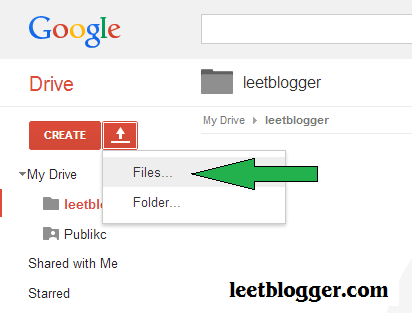


Getting File Links
Links that have been copied to a notepad or less like this:https://drive.google.com/file/d/0B15D6LP8b9wYVlliMVFfemJOT1U/edit?usp=sharingNote that in the code block, to use the file replace the URL address above
https://googledrive.com/host/0B15D6LP8b9wYVlliMVFfemJOT1U
Storing files in the Template
As usual, if the file is a JavaScript then save the file above the </body> or below the </head> with a format like this:<script src="https://googledrive.com/host/0B15D6LP8b9wYVlliMVFfemJOT1U" type="text/javascript"></script>If a CSS file, save it under <head> with the format:
<link href="https://googledrive.com/host/0B15D6LP8b9wYVlliMVFfemJOT1U" rel="stylesheet" type="text/css"/>» DO NOT FORGET TO LIKE N Yeach comments ...
Leet Blogger 2nd wallpaper | Hacker Attitude
Here is Hacker Attitude, This wallpaper Gift for Hacker

» DO NOT FORGET TO LIKE N Yeach comments ...
Click On Image full preview
Facebook Edit lookback now as you wish

This feature could make us pleasure for the old stuff stored on Facebook. If you want to try to make it, can click on this link Facebook lookback, make sure you've login with your Facebook account.
But, the problem you want to discuss now is, along with photos taken by the moment Facebook lookback is RANDOM, so sometimes events that do not want us to show even appear on Facebook lookback.

Simply open a page of Facebook lookback , then in the upper right corner click the "Edit", then select photos or whatever Moment indeed and deserve decent input into your video.
Like Facebook Page , Follow Twitter or add Google + to continue to obtain the latest information about technology.
» DO NOT FORGET TO LIKE N Yeach comments ...
How to Install WhatsApp on PC or Laptop

Messaging applications such as WhatsApp, Viber, Line and Blackberry Messenger launched for Android and iOS devices seems to be very popular today. Because of its popularity, is certainly never occurred to you to run it on a device such as a PC or a laptop computer instead?
Some services such as Viber and Line has a desktop version that you can install on a PC, but the majority of mobile messaging applications do not have such facilities. Because it is still associated with software/software, then you can actually manipulate the application so that it can be used on a Windows PC. One of the popular messaging application that does not support the PC there is WhatsApp. Here, JalanTikus will give tips on using WhatApp on a Windows PC.
Install Bluestacks
Bluestacks is the Android emulator. Broadly speaking, Bluestacks is the best solution to run Android applications on Windows. If you are using Windows 8, of course, the experience of using Android apps on Windows became more fun, because of the touch screen support.First, Download Bluestacks and install on your computer.


Bluestacks will ask you to create a Google account before you can install the application. Sign in with your Google account or create a new one if you have not got. Next, you will connect Bluestacks with a Google account to be able to download the application.
Install WhatsApp on PC
After logging in or create a Google account, you can directly install apps from the Google Play through Bluestacks. Same way as when downloaded and installed on Android devices.
Run WhatsApp Application on PC
After running the installation process, then you can run the application WhatsApp and make arrangements as needed basis.First, enter the phone number you use. You can use the phone number or house number.
WhatsApp still consider applications to run on mobile devices, therefore, you need to wait about 5 minutes to receive the SMS verification. This process can not be bypassed.
After 5 minutes, WhatsApp will offer verification services through phone calls. You can do the verification for home phone in this way.

» DO NOT FORGET TO LIKE N Yeach comments ...
Leet Blogger Wallpaper
Hello every one, how are you. Today i was free so thought why not make Leet Blogger wallpaper :)
here is my little try i hope you all like this.

» DO NOT FORGET TO LIKE N Yeach comments ...
here is my little try i hope you all like this.
Click On Image full preview
» DO NOT FORGET TO LIKE N Yeach comments ...
17 Ways to Secure WordPress from Hacker

Although there is always the latest update from wordpress. sometimes even appearing new bugs that quickly spread. So this information could be missed if the new cracks appear.
Security can Optimization from 2 sides. i.e on the server side and on the script. If you are a user of shared hosting. then you can do is in the script alone. But you should also be able to choose which hosting is a good security. because you may already optimization script but it still hacked due JUMPING.
Jumping/jump: If there is one web that successfully broken. then put shell. then the shell was also able to break through the web/other cpanel account in a single server. In anticipation of jumping could use cageFS features of CloudLinux. ( Source )
Here's 17 Ways to increase the security system (security ) + WordPress Plugin:
1. Not Using username "admin".
Because the username "highs" which actually became soft food for hackers. It is better to use a username that combines letters and numbers. Eg: "s83r2v". w1sSy.2. Updating to the Latest Version.
Always have a website that is updated. It is to close the gaps (holes) which can be penetrated by hackers. The new update of the information will usually be available on the main website WordPress [http://wordpress.com/] or the front page of the administrator (wp-admin )3. Delete Files "readme.html".
File "readme.html" contains your WordPress version. Just delete the file immediately after you upgrade WordPress.4. Delete Files "install.php".
File "wp-admin/install.php" only be used when installing WordPress. It is no longer necessary if WordPress is already running. So. remove the file from the WordPress system.5. DELETE! And Do not Use Default WordPress Theme
Later there is the issue that many hackers who attacked the WordPress website. go through the given default WordPress theme called "Twenty Ten", "Twenty Eleven" and "Classic". Perhaps we should not use that theme. and removed it. Because without any used. hackers can still attack through there.6. Use a Strong Password.
Once again we have to learn to be a man who s83r2v. But it can help us if we have the password strength maximum. It could also using the to Get a strong password.7. Protect Files "wp-config.php".
We must make these files can not be accessed by anyone. It's easy. just enter this code in the file".Htaccess" you:
8. Block Folder "wp-xxxxxx".
We do not want the folders in the system Wordpress explored by anyone. So. enter this code in the file "robots.txt":
9. Remove WordPress version.
Enter this code in the file "functions.php" in your themes:
10. Change Table "Prefix".
This method is quite effective. but it is rather difficult. especially if the website is already running. The trick is to backup your database first. With the help of Notepad. do "find and replace" to change each prefix "wp_" into another prefix such as "newp_".Once done. import it into phpmyadmin SQL so that there will be two kinds of tables. That table with the prefix "wp_" and "newp_".
If the conversion process is complete. now just replace the existing table prefix in the "wp-config.php". Find the following code:


11. Adjust CHMOD permissions.
Make sure the CHMOD permissions on files and folders according to the website you have suggested. usually permissions for the folder: 755. and for the file: 644- Login to cPanel and click the "File Manager".
- Change the file permissions. Htaccess to 0404
- Change the file permissions on the wp-blog-header.php, wp-config.php, index.php into 0400
- Change the permissions on the folder wp-admin, wp-content, wp-includes to 0705
12. Periodically backup.
It's good we have backups on a regular basis. For hosting account using cPanel. can create backup files through the backup feature provided by cPanel ( cPanel - > Backups ). The backup file is usually can be secured/stored by downloading the file to your personal computer. So if at any time your website hacked. you can re-upload the backup file. and then to request the technical side to restore your backup files via support ticket at hosting your place.13. Scan your Computer
It is often not realized. it turns out that our own computers enter into hosting malware which then becomes a tool for malware authors to be able to get into the system website/hosting us. so you should always scan your computer/laptop that you use on a regular basis.14. Change passwords periodically
Surely if we hacked website. we immediately change the password directly with the new password. but it would be better if this is done every month and as a whole ( FTP. MySQL. cPanel. and WordPress Dashboard )15. Changing the default secret key in wp-config.php
For a new secret key you can get from the official site wordpressafter a hacker managed to log on Wordpress us. then the cookies from the record will be stored so that hackers can still get into the dashboard even though the password is we replace with a new one. to anticipate please change the secret key in the "wp-config.php" with which you can link above.
secret key examples:
define(‘AUTH_KEY’, ‘SBp#h4VSBp#[6K])*6K5;GccHyziEPbsvV&fR0]GccHyziEPbs)3>EhK.$P~W4v!QhW]W4v!Q:47s2GRrq@!K&’);
16. Checks .Htacess soon
Take the time to check this one file. if you do not want any computer that accesses your website instead of the website hit by malware malicious hackers posted on your website htaccess. to redirect your website to malicious websites. it makes you be hacked and infected with malware at the same time.
17. Me-recreate your hosting
This latter point is you do only if you repeatedly hacked back while all the security tips you have done. is due to hacker program has been planted in your website making it easier for hackers to re do the hack. then you can clean up your hosting to a new state to buy hosting. please create a support ticket to the technical part with the subject "recreate hosting".Here are the Best Security Plugins for Securing WordPress Blog:
3 Install and activate the following plugins
Tutorial How to Secure WordPress from Hackers can not be 100% secure your website. but most do not close the security gaps. There is no perfect security and forever. meaning that not all settings can then be saved, since maybe that is now considered safe tomorrow has become no longer safe.
Know about Pay Per Click Affiliate Program

All it costs money to run a website, and a very good way to bring extra money to pay for them is to host pay per click advertising. At the most basic level, you place ads on your website that runs through an affiliate network. Every time a visitor clicks through on one of the ads, an advertiser has to pay a small amount of money the affiliate network. The affiliate network will then pay you a portion of it for each click.
Each ad will have an associated cost per click that will depend on how popular your website and number of visitors who clicked on the ad. If you run a website with millions of unique visitors every day, you will be able to charge more money per ad than if your website have hundreds of visitors a year. Relevance of your site to advertisers can also help to determine how much you can make from each ad. A company that wants to advertise on a website that displays a lot of content that is relevant, interesting and popular can expect to pay a premium, but will often get better results over their advertising investment.
If you run a website and are interested in using this type of advertising, then you will probably have to work with ppc marketing agency that will be able to sell ads on your website to advertisers. these agencies work as intermediaries who place PPC ads for their clients, which results in sales for you.
There are two main methods used to set prices for a fixed-price advertising or price-based auction. By paying a fixed price per click program, the advertiser will pay the same amount for each click regardless of the page that hosts the ad. For Price Auction-Based, there is an auction among advertisers to host ads on your page, and the winning bidder will have the best serve ads on your site.
Marketing agents will generate a report that shows the number of clicks, as well as an invoice for the amount owed from each advertiser . Reports will be produced on a regular basis and can be used to monitor progress against budget advertising campaign.
One of the biggest problems faced by advertisers running PPC campaigns is click fraud. This occurs when a person or automated script which does not have an interest in clicks on the advertiser's ad repeatedly times. flows It is a way of cheating the company's advertising budget. belief was some click fraud so far. By regularly checking the report, advertisers should be able to see any attempts to click fraud and automated systems to detect it is improving all the time.
Whether you run a small website in your spare time or a great website for your business, anything that can help you pay for it should be good. A well-run program that PPC can certainly bring in some extra income and make paying for your website that much easier. You never know-you might just be able to bring enough to make it a full time job.
» DO NOT FORGET TO LIKE N Yeach comments ...
How to Get Alexa Pro in Free

Today I will share tips and tricks blogger again to you all, yaiut How to Make Alexa Pro. Alexa, is a website that served to see or manage all rank of websites or blogs that exist in the world. Blogs or Websites that quality can be seen from its alexa ranking.
In this article I do not teach you how to sign Alexa, but teach you how to How To Make Free Alexa Alexa Being Pro Free .
From the name alone we already know that the ALEXA PRO is PAID. So I will teach you how do it we get Alexa Pro but not spending money at all. Are interested, please follow the following ways.
- For those of you who have not signed up Alexa, please list HERE .
- Or for those who are already registered, please LOGIN alone as usual.
- If you've LOGIN , enter PRODUCT
- After that you will get 3 options.
- Choose the least expensive or the BASIC
- Click START YOUR TRIAL (his trial anyway, but pay well)
 |
| Enter the URL of your blog |
- Click on ACCEPT TERMS
 |
CLICK ACCEPT
 |
Note: Do not worry, here I've been providing for payment of his credit card FOR FREE! so you do not have to worry.
Number: 4921672501467397
EXP: 0617
CVV: 641
Name: Melanie Azkona
Country: ES
State: Gipuzkoa
ZIP: 20003
City: Donostia
Street: Calle San Vicente 9-2
Phone: 943421387
- This is his proof:

» DO NOT FORGET TO LIKE N Yeach comments ...
Open New Link When Click On Image
When uploading files using methods that have been available by blogger.com, by default the file will be opened on the same page.
There are times when it is nice when referring to the same blog, but not good when a blogger to refer to other places. This is because when open on the same page, visitors have to click the back button to return to the original blog.
This tutorial will explain how to make a picture with a link will open in a new tab when clicked.
Note that both of these images, click on them.
1) Figure 1
 2) Picture 2
The first picture does not affect any, but the second picture takes you to ittechnohub.com.
Do not be surprised if this very simple tutorial. :)
» DO NOT FORGET TO LIKE N Yeach comments ...
There are times when it is nice when referring to the same blog, but not good when a blogger to refer to other places. This is because when open on the same page, visitors have to click the back button to return to the original blog.
This tutorial will explain how to make a picture with a link will open in a new tab when clicked.
Note that both of these images, click on them.
1) Figure 1
Do not be surprised if this very simple tutorial. :)
<a href="Put a link to open here" target="_blank" >For example, to code the second picture is like this
<img src="Put the image url here"/></a>
<a href="http://www.ittechnohub.com" target="_blank" >For the second picture, the link will be opened in a new tab. If you want to open a link on the same page, exhaust target = "_blank"
<img src="http://www.google.com/intl/en_com/images/logo_plain.png"/></a>
» DO NOT FORGET TO LIKE N Yeach comments ...
Tips to Increase the Number of Visitors and Pageviews Blogger

What's pageviews?
Pageviews are the number of pages viewed and read by visitors in a single visit, whether the visitor is coming from search engines, social bookmarking or from websites / blogs. Increase the number of pageviews is very important to do, why? due to the increasing number of pageviews on the blog will automatically increase and rank blog has SERP position that good anyway.Pageviews actually measure how useful the article in a blog that is read by them and if a blog has articles that do not provide benefits even cheat, then they will leave the blog and reluctant to visit it again.
To increase the number of visitors and pageviews blog, you can apply the following tips.
1. Create a unique and quality articles
Unique and quality articles that will make the visitors feel satisfied for having had the right information and felt what he had read he could not get anywhere else.2. Add article periodically
Blogs that have a number of articles which are many and varied to make the number of page views will increase. It is possible visitors will see and read more than one article. For that try to make 2 to 3 articles every day and if it can not, at least try to make an article every day. However, do not make the post copy and paste the results of adverse because in addition to its original author, can also harm your own.3. Take advantage of social bookmarking network
One way to increase the number of visitors is by using social bookmarking networks such as facebook, twitter, feedsburner (subscribe via email) as well as other social networks. The trick is diligent to share the latest articles as well as long to social bookmarking. Do not forget to install the share button on every article that you post. It aims to make it easier for visitors to share the article he had just read.4. Put the Sidebar/Widget interactive
Benefit from the sidebar by placing recent post, popular posts and other gadgets that you are easily seen by visitors. In this case I emphasize to use the facilities that have been provided starndard gadget bloggers too lightly because in addition to light at the time of the blog page is opened.5. Create a glowing article or concatenated
Creating articles that glow will make the blog page pageviews will increase. Why is that? because the article is concatenated to make visitors curious and want to see the continuation of the article he had just read.6. Create a post related articles below
By the time a visitor finishes reading an article he had read, could accidentally get to see the other post-post related to the article he had just read and interested to see the content of the linked article.7. Create a table of contents
List the contents of a blog will make it easier for visitors to find various kinds of articles that he did not get on the sidebar or related post.8. Use the title interesting and intriguing
The title is interesting and contains elements of a curious visitor could attract visitors to open and read the article.9. Create a blog light when opened
Blogs are lightweight and do not take a long time loading will make the visitor feel at home. Of the few cases that I find, a blog that has a load time/weight will make visitors lazy to open another article and worse still, the page that have not been completely open, visitors are immediately closed the browser without seeing the contents of the article.10. Internal linking pairs on each post
Offer to visitors by increasing the internal links that refer to other posts. In addition, the internal link is also one step to SEO blog.11. Blog walking
In addition to goodwill, blogwalking can also increase the number of visitors by leaving comments on blogs you visit.Best Recommended! : Increase Visitor Traffic and Make Blog More SEO Friendly by Changing Tag H3, H2 and H1
Those are some tips to increase pageviews as well as visitors to the blog. You can also add other tips that are thought to increase the number of visitors to your blog!
SEO
,
Tips & Tricks
,
Traffic
Google Gravity

Bored with the look simple and simple google, you might try this trick.
Google gravity , the site is designed so that you will get a different experience in using the Google search engine to find the results of your search.
Open Google.com, then type "google gravity" (without the quotes) in the search box, then click the button "I'm Feeling Lucky", see what happens.
Yes, you will be taken to another page that is similar to the Google page. A moment later you will see all elements of the page, from the Google logo, the search box and there are menus that drop down as drawn by the force of gravity. Wow, weird is not it?
Not only that, you can even play these elements. Try to move the element by clicking on one of these elements-resistant, move wherever you want. Each less exciting? Now try to throw you move the last element to another element by releasing the mouse click. Elements were going to collide with other elements and the two bounce off each other. Wow, still less exciting? Now try googling as usual you do, click on the search box and enter whatever word you want to search and hit enter. Search results of keyword you enter will fall from above. This time I am sure, you will definitely say this "fun"!
Google Gravity Project was created by a team of Mr. Doob. The effects of gravity created by the use of Box2D js. Many Internet users are claiming that Google Gravity is one of the best Google tricks ever.
Happy playing!
7 Reasons – Why Not to Copy Content From Other’s Blog?

The quality of each job is more valuable than quantity. The authenticity of the work, further beautifying qualities. It has been observed that the copying of the article and copyright infringement was heavily criticized around the world and is not recommended. This is only a brief bring benefits to people who do. Shortcuts do not have roots to last longer.
There are no areas that are not affected by copyright issues. Blogging is one such field, where each day the number of people who copy content from other sites increased rapidly. They used the technique of "CUT, COPY & PASTE" and make the work of others be theirs. This is very detrimental, not only for bloggers, but also gives a bad reputation in the world of blogging.
Here are 7 reasons why the content of other blogs copying prohibited.
1. Short-term benefits
Copying content from other blogs will only bring short-term benefits. Initially you will feel comfortable, maybe you will start a popular blog and the money will start to get into your coffers. But cheap popularity will not last long, and one must be stuck in the abyss of humiliation and bad reputation.
2. Caught Red Handed
There are many opportunities that you would have caught copying content from other blogs to your readers. The result they will hate you and your content, I am sure they would prefer to read the content of the original source rather than the result of plagiarism. You will start to lose traffic which will have a direct impact on the popularity of your blog and earnings.
3. Lost Credibility
When your loyal visitors knew that all this time you just copy content from other blogs, you will soon lose the trust that has built a loyal visitor you for this. Blogging is a type of expression that builds an emotional connection between bloggers and their readers. Both properties will be bound to each other emotionally. When the incident occurred the reader disappointing injured. They will stop you and appreciate your work.
4. Loss of authenticity
If you are a professional blogger and every day thousands of people come to read your articles, like this one mistake will take away the uniqueness and originality of your article which has been very popular. Your blog is probably known to the original productivity will start to lose value.
5. Reflecting the personality
One's personality can be judged from the actions and habits. Stealing other people's rights describe your personality in a very bad way at all.
6. Cleverness of Search Engines
The search engines are too smart and have the ability to choose the original content. If you copy content from other articles, then search engines like Google will never put your content on the first page, maybe you will stop by the article on page 10 +, no one will find it. It is very harmful because the search engines will not forgive you and will give a "bad ratings" for your site. And I'm sure most of you know what that means "bad ratings" for your site???
7. International law
Currently it has a lot of international organizations working in the field of copyright protection. Website owners can hire the services of an organization like the DMCA to protect copyrighted content, every blogger who copied the content of the website owner will be dealing directly with the DMCA. This will have an impact on her career and bad reputation.Conclusion
Are you happy if other people benefit for free from your hard work? I'm sure no one will forgive him in any case. But in addition to all that, a person can be more creative when it deadlocked in making quality content. In these circumstances he can get help from other existing content but does not mean copying the whole content to the blog. He can only take an idea and then open a new way of thinking in a broader perspective. Even considering the worst case, if there is no other choice but to take the same idea then it should be quite able to reframe the new words in their own way.
SEO
,
Tips & Tricks
,
Traffic
Subscribe to:
Posts
(
Atom
)


